.svg)
|
Gold Standard Phantoms
|
Document ID: PD-3000-6007
|
Foreword
These instructions for use contain all the information necessary to operate the MultiSample190F in accordance with its specifications. This information includes explanations of the functions of the controls, displays and signals, the sequence of operation, and connection and disconnection of the parts and accessories you can remove.
You must regard these instructions as a part of the equipment. It is important that these instructions are read thoroughly.
Disclaimer
Gold Standard Phantoms considers itself responsible for the effects on safety, reliability and performance of the equipment only if:
-
Assembly operations, re-adjustments, modification or repairs are carried out by persons authorised by ourselves, and
-
The electrical installation of the room where the device is used meets the requirements of the standards in force, and
-
The device is used in accordance with this instruction manual.
Figures within this instruction manual may display other models of the MultiSample. This is for demonstration purposes only.
Glossary and Abbreviations
|
Term |
Description |
|---|---|
|
MRI |
Magnetic Resonance Imaging |
|
NMR |
Nuclear Magnetic Resonance |
|
MS190F |
MultiSample190F |
Introduction
About this Instruction Manual
The purpose of this instruction manual is to promote the safe use of the MultiSample190F during its expected service life. It describes the use of the device as intended by the manufacturer.
Identification
Product Name: MultiSample190F
Model: MS190F
Manufacturer and Contact Information
|
Company Identification |
Gold Standard Phantoms Limited
|
|
Telephone |
+44 (0)114 3271540 |
|
Email (competent person) |
|
|
Languages spoken |
English |
|
EU Authorised Representative |
AR Experts B.V. |
|
EU Authorised Representative Address |
AR Experts B.V.
|
|
EU Authorised Representative Email Address |
Intended Use
The MultiSample190F is designed for Quality Assurance measurements of Magnetic Resonance Imaging where the temperature of the phantom must be kept close to body temperature for an extended period of time. Phantoms (also known as Quality Assurance Devices) are used in lieu of a human being inside an MRI scanner to assess its performance. The user should refer to the MRI device’s instructions for use to set up the correct pulse sequence for a given outcome.
Intended Users
The MultiSample190F is intended for use by qualified MRI system operating personnel. These devices must be used by competent personnel who have the applicable education and experience. This includes, but is not limited to:
-
Radiographer/MRI Technologist
-
Clinical Scientist/Hospital Physicists
-
MRI Physicist
-
Radiologist
-
Students/Researcher
-
Other trained Medical Professional.
This device must be used by a skilled person who has the applicable education and experience to enable them to perceive risks and to avoid hazards which operation or maintenance of the device can create.
Warnings and Cautions
About Warnings and Cautions
Essential safety descriptions are provided in the instruction manual in the form of either a Warning or a Caution, as described below:
A WARNING is given when the personal safety of the patient or a user can be affected. Disregarding this advice can cause an injury.
A CAUTION is given when special instructions must be followed. Disregarding this advice can cause damage to the device or other equipment.
All users must familiarise themselves with all the warnings and cautions contained in the instructions before using this device.
Device Description
About the MultiSample190F
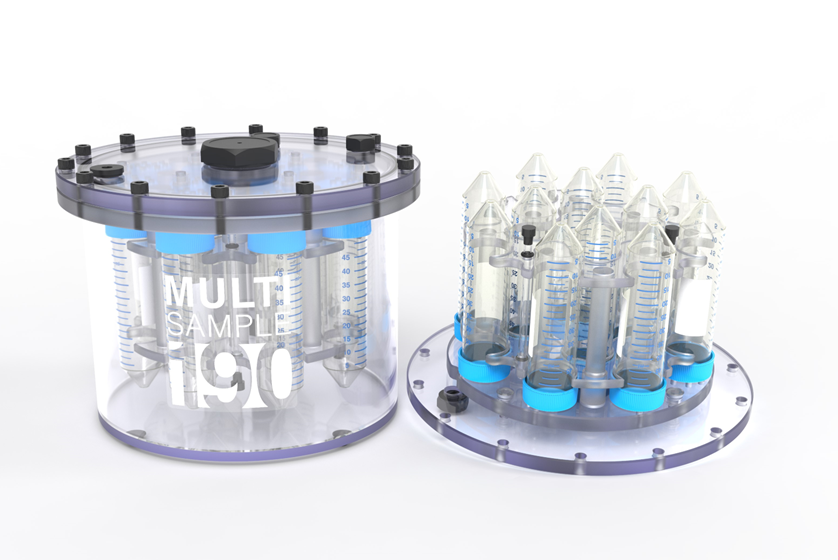
The device is a 190mm diameter cylindrical phantom designed for use in an MRI scanner. It is capable of holding up to 12 industry standard Falcon BD 50ml polypropylene vials. It addresses the need for a standardised container for multiple sample vials when preparing phantoms in-house for advanced MRI techniques.
Applications include:
• Quantitative T1/T2 relaxometry
• Metabolic imaging
• Spectroscopy
• Multi-nuclear imaging
• Diffusion
• Fat fraction
The MultiSample190F can be supplied:
-
Empty, for the customer to fill as required.
-
With pre-filled vials.
-
With pre-filled vials, in a defined configuration, and with the main chamber filled.
Materials
|
Component |
Materials Used |
|---|---|
|
Main Body and Sample Holder |
Polycarbonate, Nylon, Nitrile rubber |
|
Vials and Caps |
Polypropylene, Fluoroelastomer |
|
Phantom liquid |
Distilled Water, Manganese (II) Chloride, Surfactant (C8-18 Ethoxylated Propoxylated), and preservative (methylisothiazolinone and chloromethylisothiazolinone) |
WARNING: The phantom liquid is a mild irritant and may be skin sensitising. In the event of a leak or spill of the phantom liquid wear protective waterproof gloves when cleaning any spillages and dispose according to local regulations. See the safety data sheet for more information.
Storage Instructions
Store
-
In a dry and well-ventilated environment
-
Between 15 °C and 30 °C
-
Out of direct sunlight
-
In an upright position
If possible, store the phantom in the MRI magnet room. This will ensure that it is at thermal equilibrium with the room and provide the most reliable and reproducible results. Either store in the supplied box, or use the supplied stand to store on a flat surface such as a shelf.
Handling Information
The MultiSample190F should be handled with care to prevent damage.
If supplied pre-filled, take care to avoid spilling of the liquid contents. Avoid contact with skin, eyes or clothing.
WARNING: Contents of Phantom may irritate the skin. In the case of contact with skin, wash well with water. Remove any contaminated clothing and wash clothing before reuse.
If skin irritation occurs, seek medical advice/attention.
Cleaning
If an MS190F phantom requires cleaning it can be cleaned with soap, water, and a soft cloth or sponge to remove dirt and debris. Organic solvents such as isopropanol may be used to remove sticky residue on the main body, however these may cause the labels to stop adhering to the surface.
Getting Started
Controls and Indicators
The temperature of the Phantom can be monitored using the included liquid crystal thermometer.
Note that this indicates the temperature of the outer surface of the phantom, and not necessarily the internal temperature. It provides an indication of the temperature, but should not be relied on for accurate temperature measurements. The phantom also comes with two NMR tubes filled with Ethylene Glycol, which can be used to assess the temperature of the phantom during scanning.
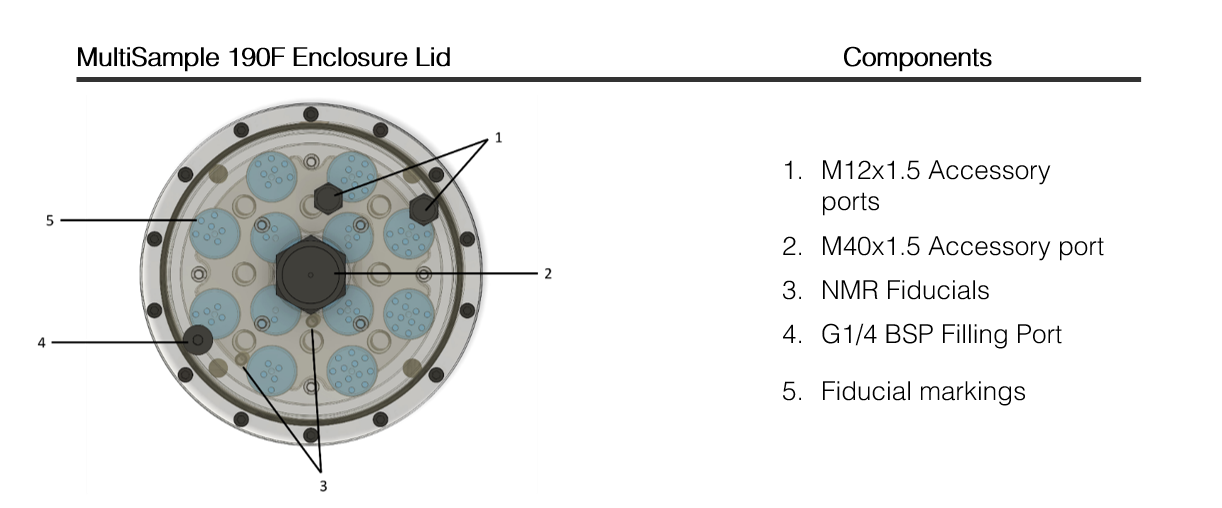
In addition, fibre optic temperature probes can also be inserted via the M12x1.5 Accessory Ports.
WARNING: The two NMR tubes are made from borosilicate glass and are fragile. Take care when accessing the vials. Breakage will result in small shards of glass that are very sharp, and could become embedded in wounds.
Operating Instructions
Torque Screwdriver
WARNING: The supplied torque screwdriver and stainless steel bits are made from steel and are magnetic. They should not be brought into the MRI scan room as they present a projectile hazard.
CAUTION: all screws must be tightened using the supplied torque screwdriver, with the torque correctly set as advised. Failing to do so may cause damage to the MultiSample190F.
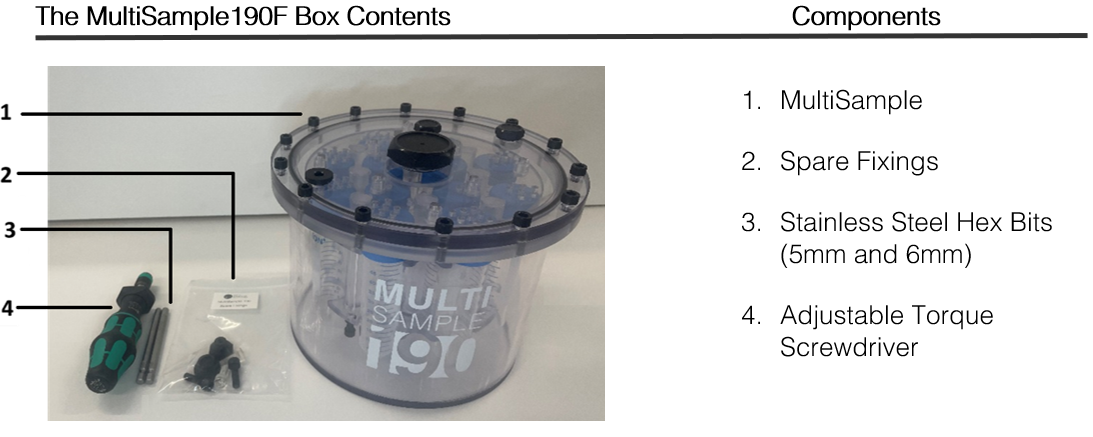
A torque screwdriver is supplied with the MultiSample190F, so that the screws can be correctly tightened.
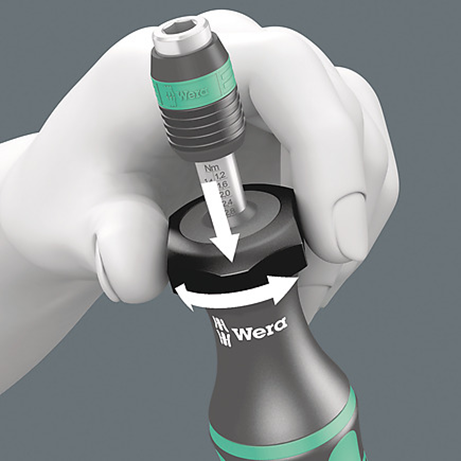
To set the torque of the screwdriver, push the adjustment ring down, and rotate the body of the screwdriver.
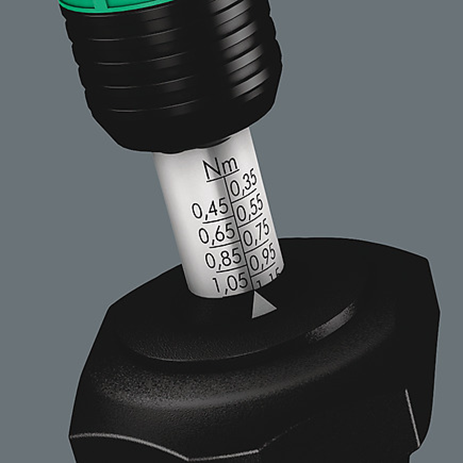
The torque setting is indicated with the white arrow.
The torque screwdriver has a clutch that slips when a torque above the set value is encountered. When the clutch slips it makes an audible click, indicating that the screw has been tightened to the correct torque.
When loosening screws the clutch will not slip, regardless of the torque setting.
Accessing the MultiSample190F Vials
To access the vials, follow the step-by-step instructions below:
-
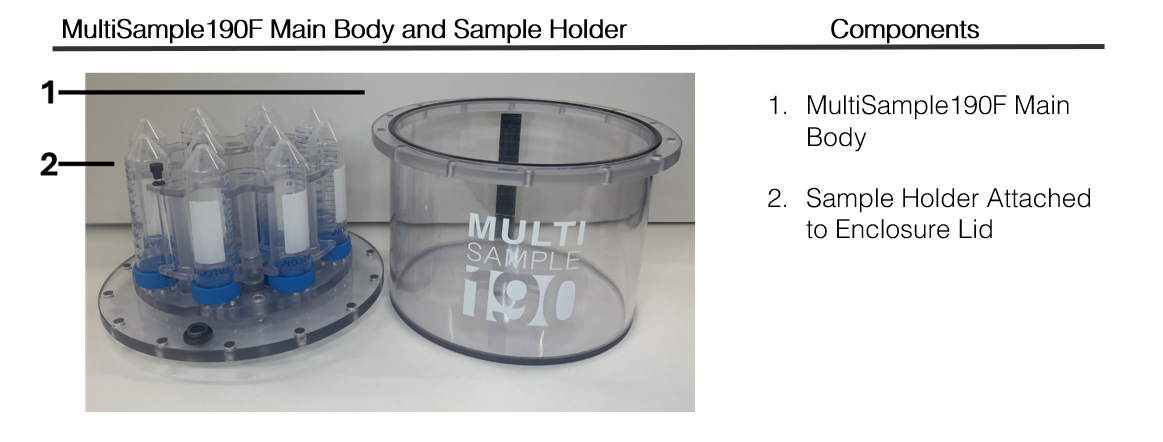
The sample holder must be removed from the main body. The fourteen screws on the outer edge of the Enclosure Lid must be unscrewed using the Torque Screwdriver and 5mm Stainless Steel Hex Bit.
-
Once all then screws have been removed and placed in a safe place, separate the Enclosure Lid and attached Sample Holder, from the main body as shown in the image
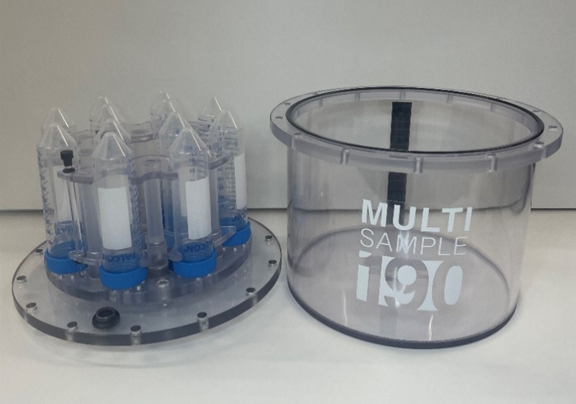
-
Remove each vial by gently pulling them out from their holder.
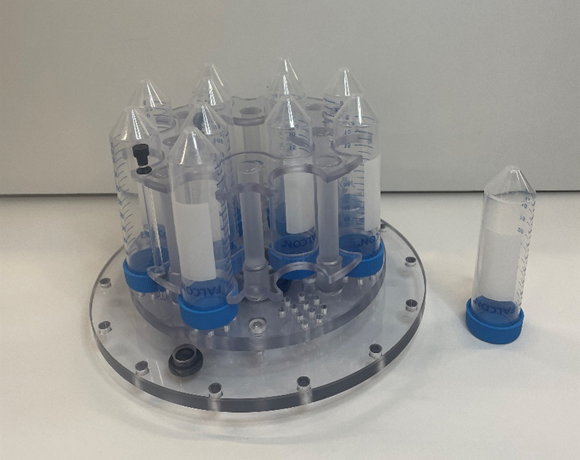
To replace the vials:
-
Ensure that each vial is closed.
-
Making sure that the vial cap is closest to the Enclosure Lid, push each vial into the selected slot until the vial clicks back into place
Assembling the MultiSample190F
-
Ensure the O-ring is correctly placed within the groove before fitting the sample holder
-
Place the Sample Holder back into the main body of the MultiSample190F.
-
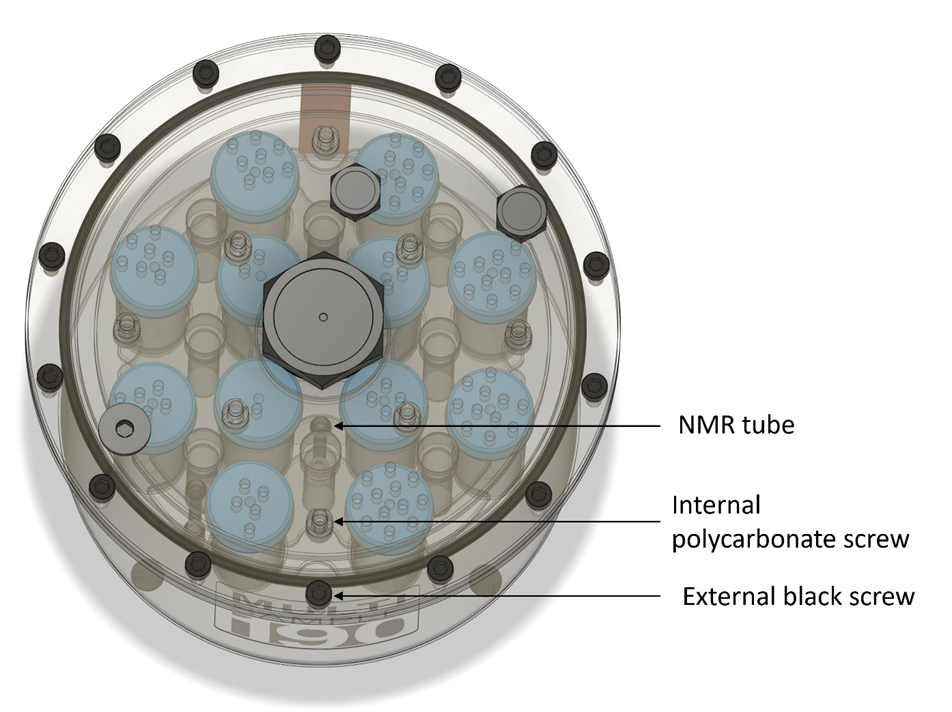
To align the Sample Holder correctly with the main body of the MultiSample190F, ensure that the inner NMR tube is aligned with the central point of the MS190 logo sticker on the main body. The external black screw should align vertically with the NMR tube and central point of the MS190 logo sticker. The correct alignment can be seen in the figure below.
-
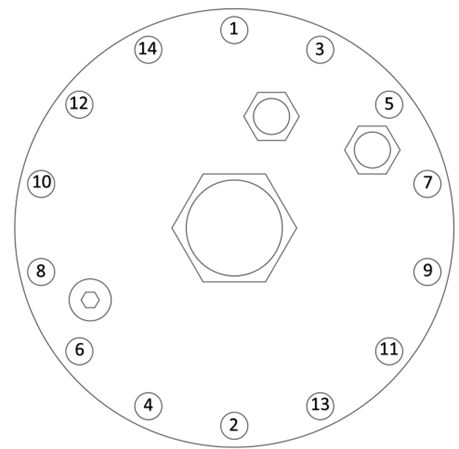
The MultiSample190 contains fourteen screws which are located on the outer edge of the MultiSample190 lid. Screws should be fitted and hand tightened first before using the torque screwdriver
-
Tighten the screws further using the Torque Screwdriver, set to 0.8Nm, and the 5mm Stainless Steel Hex Bit. Follow the order given in the figure below
Filling the MultiSample190F
The main chamber of the phantom can be “flood filled” with an appropriate liquid during scanning to ensure:
-
Good susceptibility matching between the sample and the background, optimising B0 homogeneity;
-
Background signal; and
-
Coil loading.
There are two G1/4 BSP filling ports in the lid to facilitate filling. These have solid polyamide screw-in caps with a 6mm hex socket. To fill and cap:
-
Unscrew both filling ports, using the supplied Torque Screwdriver and 6mm Stainless Steel Hex Bit.
-
Fill the chamber with the chosen flood fill liquid. A funnel (not supplied) can help here. Fill as much as possible.
-
Cap both filling ports (hand tight), then invert the phantom to move any residual bubbles to the end of the chamber. Allow any small bubbles to coalesce into larger bubbles.
-
Turn the phantom right-side-up. Open one of the filling caps.
-
Tilt the phantom so that the open fill port is raised up. Any bubbles will travel to this port.
-
Top-up the liquid until the chamber is completely full. A syringe or pipette can help here. Fill until the liquid is at the top of the filling port.
-
Re-fit the cap, and screw down so that the port is sealed but the torque screwdriver does not click.
-
Dry any residue around the port.
-
Check that there are no bubbles in the chamber. If satisfied both ports can not be fully tightened to 1.2Nm.
Note: Polycarbonate plastic is permeable to water vapour. Over time air bubbles may appear in the main chamber due to evaporation of water, so periodic topping up is recommended.
Temperature Monitoring
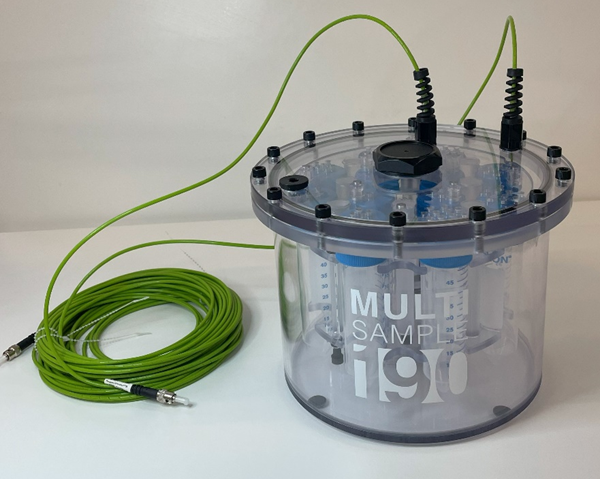
The MultiSample190F can be fitted with two fibre optic temperature sensing probes. This can be done by removing the two M12x1.5 accessory ports and fitting the probes.
Recommended orientation during scanning
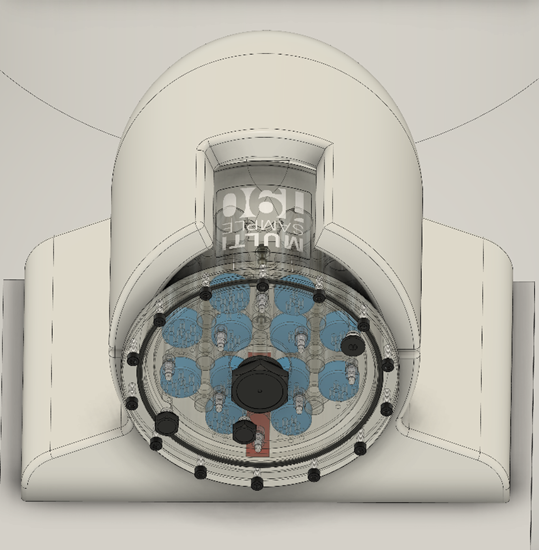
When the MultiSample190F is scanned in a head coil the following orientation is recommended:
• The MultiSample190F logo is placed facing upwards with the liquid crystal thermometer facing towards the base.
• In this configuration, the filling ports should be facing downwards and to the left.
Fiducial markings and vial locations
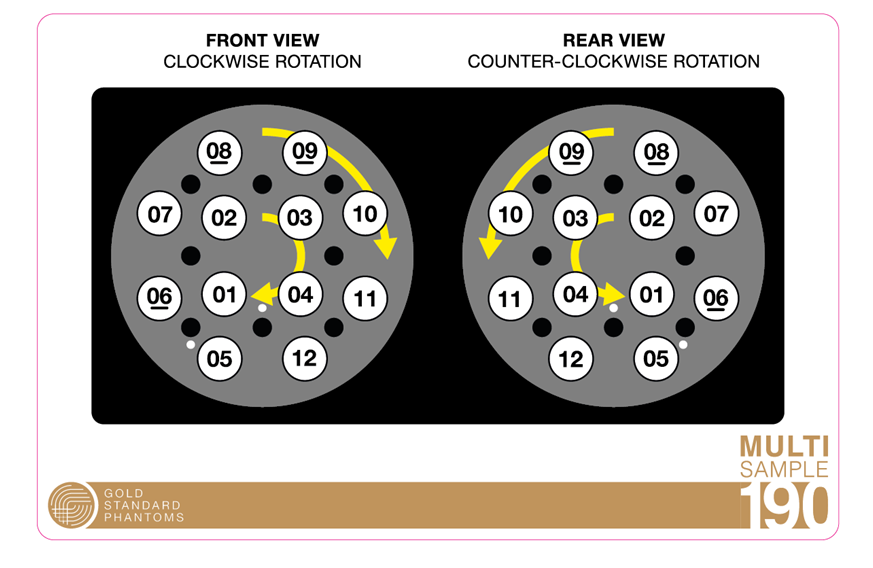
The locations of the vials in the MultiSample190F allow for easy identification once scanned.
-
The vial location key card can be used to identify the locations of vials and order of rotation depending on the orientation of the phantom.
-
NMR tube locations can be seen on the vial location key card, these are identified by two white dots.
Adverse Events
Any adverse incidents that occur in relation to this device should be reported to Gold Standard Phantoms and the relevant competent authority of the member state.
Warranty
Standard Manufacturer's Warranty (SMW)
The phantoms carry as 1 year manufacturer’s warranty.
This covers assurance regarding quality / lifespan with a promise to repair or replace the MultiSample190F under a standard RMA. Shipping and Duty charges may apply.
Disposal
Do not allow the contents of the phantom to enter drains, sewers, or watercourses. Dispose of this material and its container as hazardous waste. Disposal should be in accordance with local, state, or national legislation.