.svg)
|
Gold Standard Phantoms
|
Document ID: PD-3000-3030
|
| Revision | Summary | Date |
|---|---|---|
| 1.0 | First issue | 11 Sep 2025 |
| 1.1 | AR address update | 19 Dec 2025 |
Foreword
These instructions for use contain all the information necessary to operate the Temperature Control Bundle (TCB) in accordance with its specifications. This information includes explanations of the functions of the controls, displays and signals, the sequence of operation, and connection and disconnection of the parts and accessories you can remove.
You must regard these instructions as a part of the equipment. It is important that these instructions are read thoroughly.
Disclaimer
Gold Standard Phantoms considers itself responsible for the effects on safety, reliability, and performance of the equipment only if:
-
Assembly operations, re-adjustments, modification or repairs are carried out by persons authorised by ourselves, and
-
The electrical installation of the room where the device is used meets the requirements of the standards in force, and
-
The device is used in accordance with this instruction manual.
Glossary and Abbreviations
|
Term |
Description |
|---|---|
|
MRI |
Magnetic Resonance Imaging |
|
MRS |
Magnetic Resonance Spectroscopy |
|
PCM |
Phase Change Material |
|
TCB |
Temperature Control Bundle |
|
|
|
Introduction
About this Instruction Manual
The purpose of this instruction manual is to promote the safe use of the Temperature Control Bundle during its expected service life.
It describes the use of the device as intended by the manufacturer.
Identification
Product Name: Temperature control bundle
Contents:
-
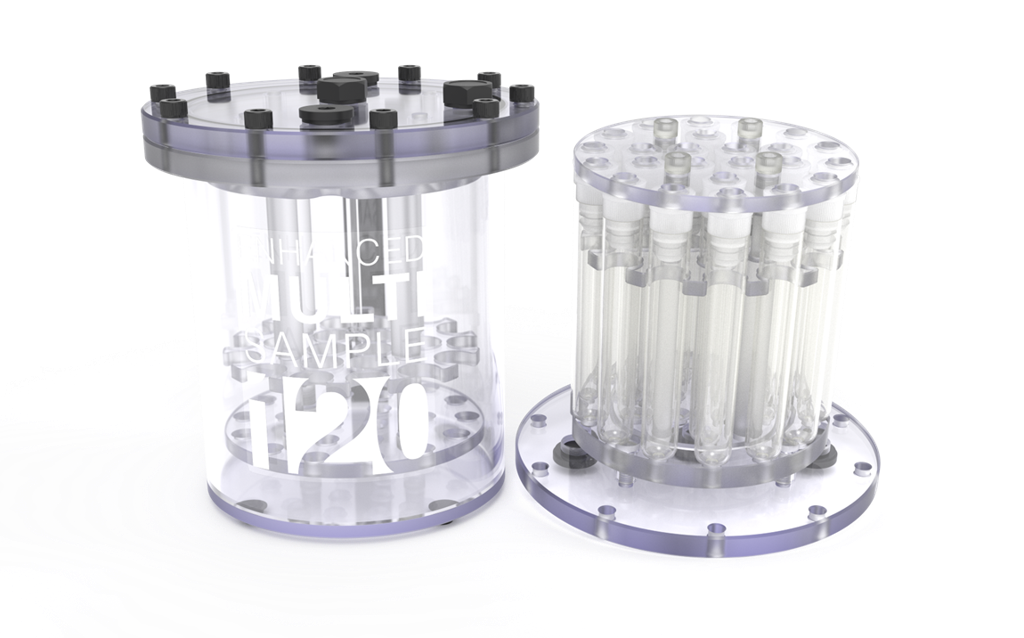
MultiSample 120E and set of Deltalab vials
-
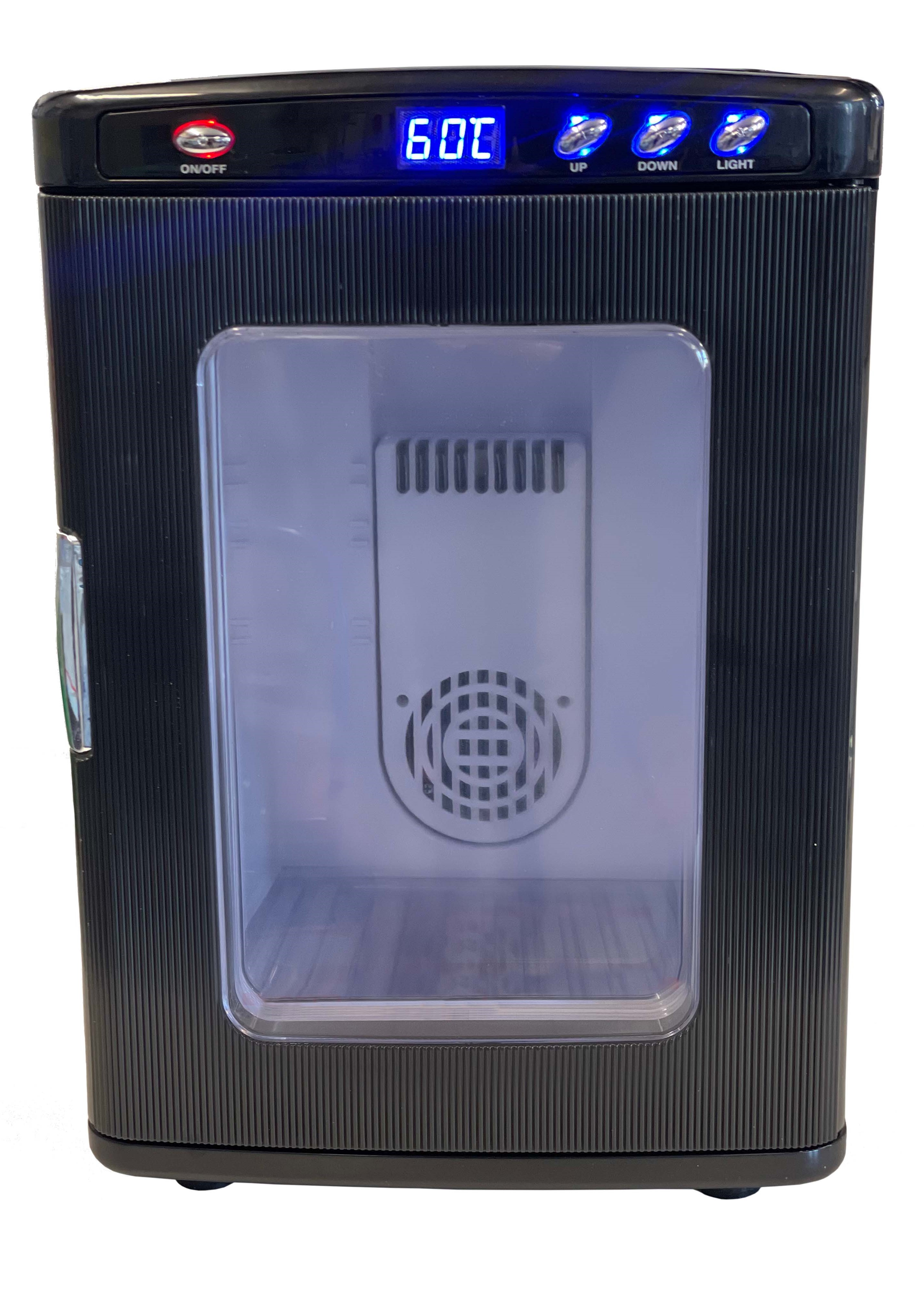
Incubator
-
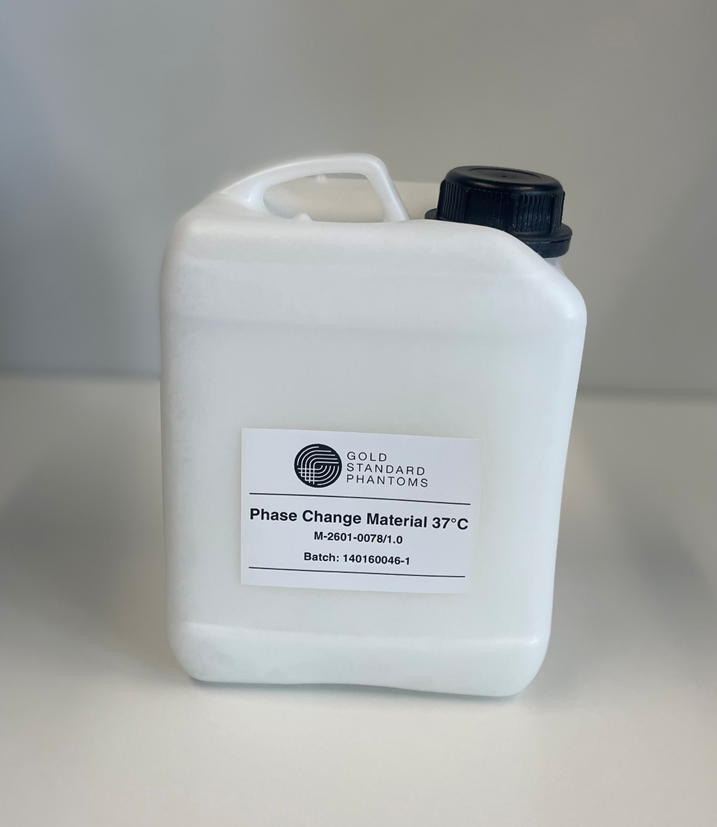
Phase Change Material
Manufacturer and Contact Information
|
Company Identification |
Gold Standard Phantoms Limited
|
|
Telephone |
+44 (0)114 3271540 |
|
Email (competent person) |
|
|
Languages spoken |
English |
|
EU Authorised Representative |
AR Experts B.V. |
|
EU Authorised Representative Address |
AR Experts B.V.
|
|
EU Authorised Representative Email Address |
Intended Use
The Temperature Control Bundle is designed for Quality Assurance measurements of Magnetic Resonance Imaging where the temperature of the phantom must be kept close to body temperature for an extended period of time. Phantoms (also known as Quality Assurance Devices) are used in lieu of a human being inside an MRI scanner to assess its performance. The user should refer to the MRI device’s instructions for use to set up the correct pulse sequence for a given outcome. Equivalent acquisition techniques need to be used on the phantom as in the humans / patients.
Intended User
The Temperature Control Bundle is intended for use by qualified MRI system operating personnel. These devices must be used by competent personnel who have the applicable education and experience. This includes, but is not limited to:
-
Radiographer/MRI Technologist
-
Clinical Scientist/Hospital Physicists
-
MRI Physicist
-
Radiologist
-
Students/Researcher
-
Other trained Medical Professional.
This device must be used by a skilled person who has the applicable education and experience to enable them to perceive risks and to avoid hazards which operation or maintenance of the device can create.
Warnings and Cautions Used
Essential safety descriptions are provided in the instruction manual in the form of either a Warning or a Caution, as described below:
A WARNING is given when the personal safety of the participant or a user can be affected. Disregarding this advice can cause an injury.
A CAUTION is given when special instructions must be followed. Disregarding this advice can cause damage to the device or other equipment.
All users must familiarise themselves with all the warnings and cautions contained in the instructions before using this device.
Device Description
About the Temperature Control Bundle
The Temperature Control Bundle enables maintenance of the temperature of a MultiSample120E phantom for an extended period of time, improving the reproducibility and standardisation for temperature-dependent MRI measurements.
It comprises:
-
A MultiSample120E phantom.
-
Phase Change Material (PCM), which fills the MultiSample120E phantom’s main chamber.
-
An incubator, used to melt the PCM either prior to filling the MultiSample120E, or once filled to re-melt the PCM before use.
Depending on the configuration the MultiSample120E may be supplied completely empty, with a set of pre-filled vials for insertion by the user, or a fully-configured phantom with pre-filled vials installed and the main chamber filled with PCM.
Phase Change Material (PCM)
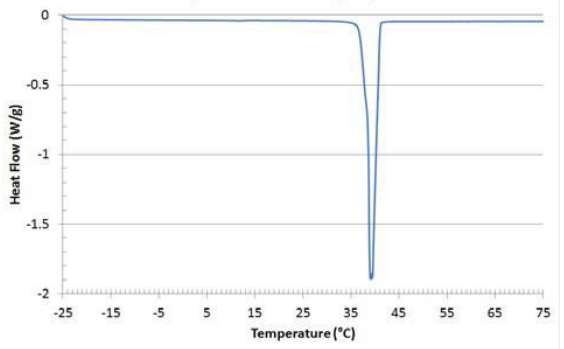
The supplied Phase Change Material is a wax-like material that is able to store and release large amount of latent heat during its phase transition between being solid and liquid. It has a melting point of 37°C and thermal energy storage capacity of 210 J/g. Its properties are given below:
|
Appearance |
Clear liquid, waxy solid |
|---|---|
|
Melting Point |
37°C |
|
Heat Storage Capacity |
210 J/g |
|
Thermal conductivity (liquid) |
0.15 W/m°C |
|
Thermal conductivity (solid) |
0.25 W/m°C |
|
Density (liquid) |
0.84 g/ml |
|
Density (solid) |
0.92 g/ml |
|
Specific heat (liquid) |
2.63 J/g/°C |
|
Specific heat (solid) |
2.21 J/g/°C |
Incubator
The Incubator is intended to be used with the PCM. The Incubator is able to reach a temperature of 45°C, allowing the PCM to be heated and melt to a liquid form. It can also accommodate a MultiSample120 phantom inside, for melting the PCM inside the phantom prior to MRI scanning.
Materials
MultiSample120E
|
Component |
Materials Used |
|---|---|
|
Main Body and Sample Holder |
Polycarbonate, Nylon, Nitrile rubber |
|
Vials and caps |
Polypropylene, Fluoroelastomer |
Phase Change Material
|
Component |
Material Used |
|---|---|
|
PCM |
Bio-based, organic, proprietary formulation |
|
Jerry can |
HDPE |
WARNING: Phase Change Material may irritate the skin. In the case of contact with skin, wash well with soap and water. Remove any contaminated clothing and wash clothing before reuse.
If skin irritation occurs, seek medical advice/attention.
WARNING: In case of contact of Phase Change Material with eyes, immediately flush eyes with large amounts of water.
Storage Instructions
Store
-
In a dry and well-ventilated environment
-
Between 15 °C and 30 °C
-
Out of direct sunlight
WARNING: The incubator MRI Unsafe and must not be taken into the MRI Magnet Room
Handling Information
Handle the PCM with care to prevent damage and spilling of liquid contents. Avoid contact with skin, eyes, or clothing.
Skin: Gloves must be worn when handling the PCM. Dispose of contaminated gloves appropriately.
Eyes: Use appropriate eye protection when handling the PCM.
Cleaning
If the MultiSample120E phantom requires cleaning, it can be cleaned with soap, water, and a soft cloth or sponge to remove dirt and debris. Organic solvents such as isopropanol may be used to remove sticky residue on the exterior of the phantom, however these may cause the labels to stop adhering to the surface.
If spilt, the PCM can be very difficult to remove from surfaces. Absorb or cover with paper towels or cloths and transfer to containers for disposal.
If the incubator requires cleaning, it can be cleaned with a wet cloth to clean the device outside and inside, wipe dry after cleaning. The incubator should be unplugged before cleaning. Do not rinse or spray water on the device. It is recommended to clean the vents regularly, e.g. with a dry brush to remove dust and other residues which can decrease the performance of the device.
Principle of Operation
The Phase Change Material supplied as part of the Temperature Control Bundle is an organic, wax-like material that has a melting/solidifcation temperature of approximately 37 °C, during which it absorbs/released a large quantity of latent heat due to it changes from solid to liquid and vice versa. By filling the main chamber of a phantom with this material, the temperature of the phantom can be maintained at close to body temperature for many hours. Given that many MRI observable phenomena are temperature dependent, this enables their assessment under controlled conditions. These phenomena include:
-
T1 and T2 relaxation times
-
Diffusion
-
Chemical exchange rates
-
Chemical shift
Example Cooling Profile
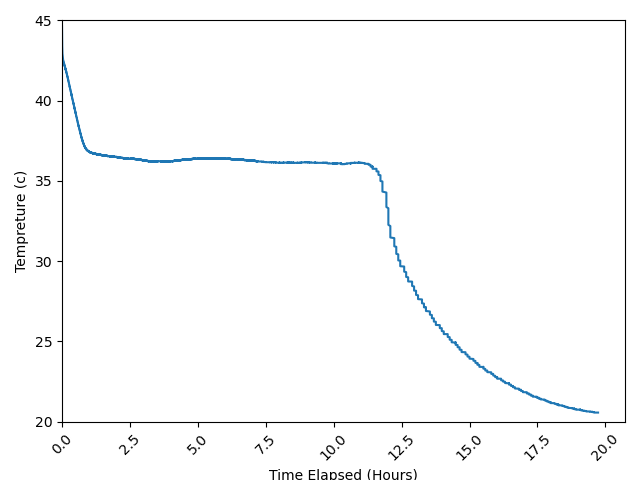
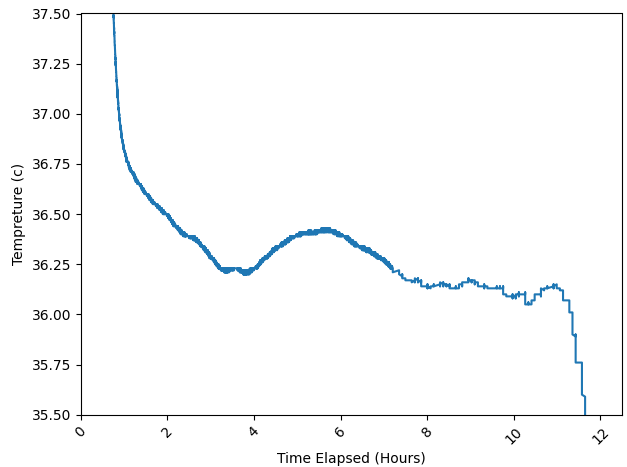
Performance data were recorded using a calibrated PT100 thermometer probe inserted into a MultiSample120E phantom.
-
After removal from the incubator, the phantom requires approximately 60 minutes to reach operational temperature (≈36.3 °C).
-
Once stabilised, the PCM maintains a temperature within a narrow range around its phase transition point.
-
The latent heat released during solidification provides a controlled and extended thermal plateau. this leads to a a thermal stability at ~36.3 °C +/- 0.1 °C for ~11 hours
Key Performance Notes
-
Operational plateau: The PCM provides a stable temperature environment around 37°C during the phase transition.
-
Cooling phase: Expect ~60 minutes delay before the phantom reaches stable operating temperature.
-
Stability window: Temperature variation during the plateau phase is 36.3 °C ±0.1 °C.
-
Duration: The plateau duration depends on ambient conditions but typically lasts several hours.
Operating Instructions
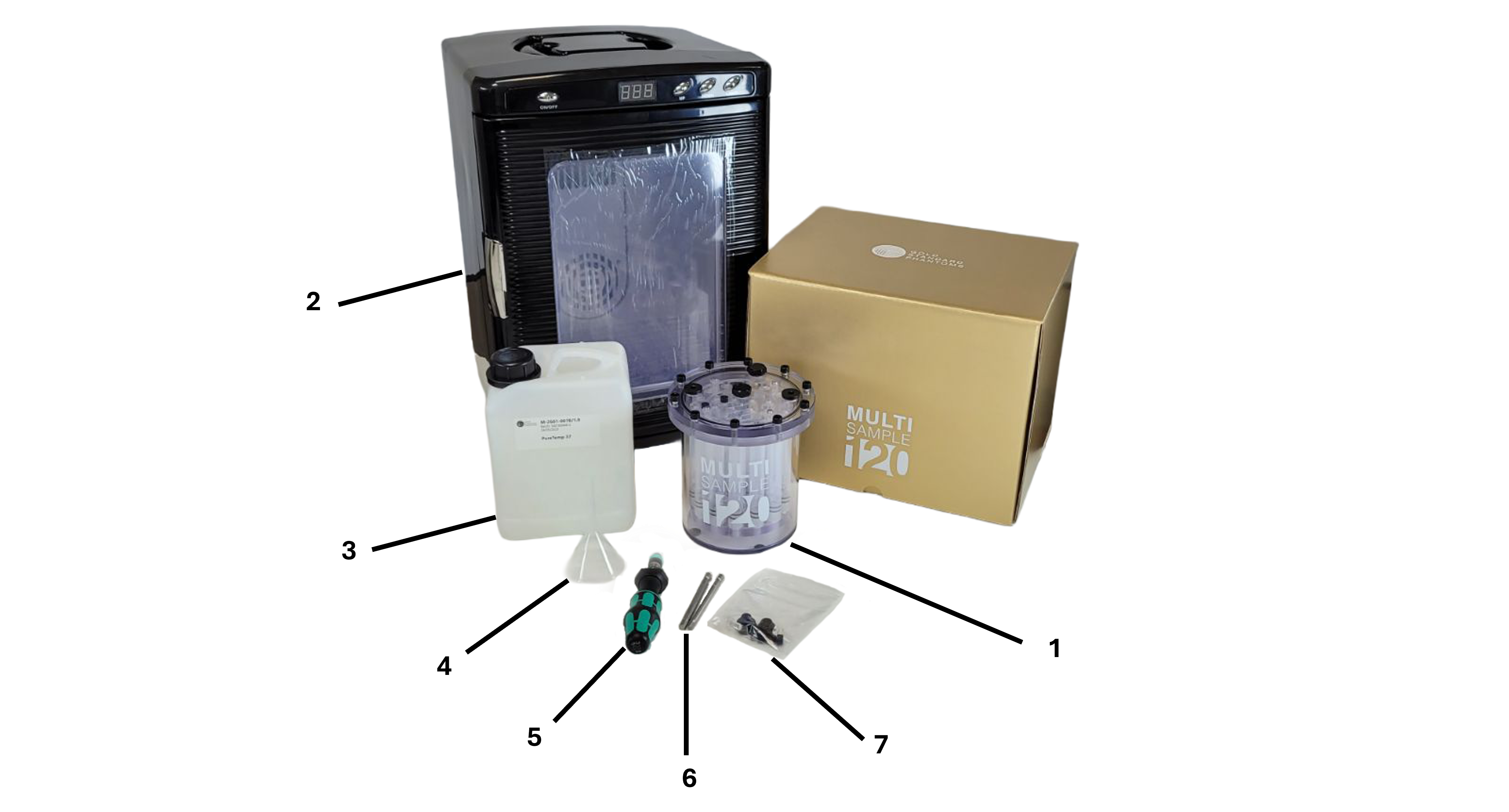
Unpacking
-
MultiSample120E
-
Incubator
-
PCM in 2.5 L jerry can
-
Funnel
-
Adjustable Torque Screwdriver
-
Stainless Steel Hex Bits (5mm and 6mm)
-
Spare Fixings
Also included: polypropylene funnel, mains lead for incubator (region specific).
Operating the Incubator
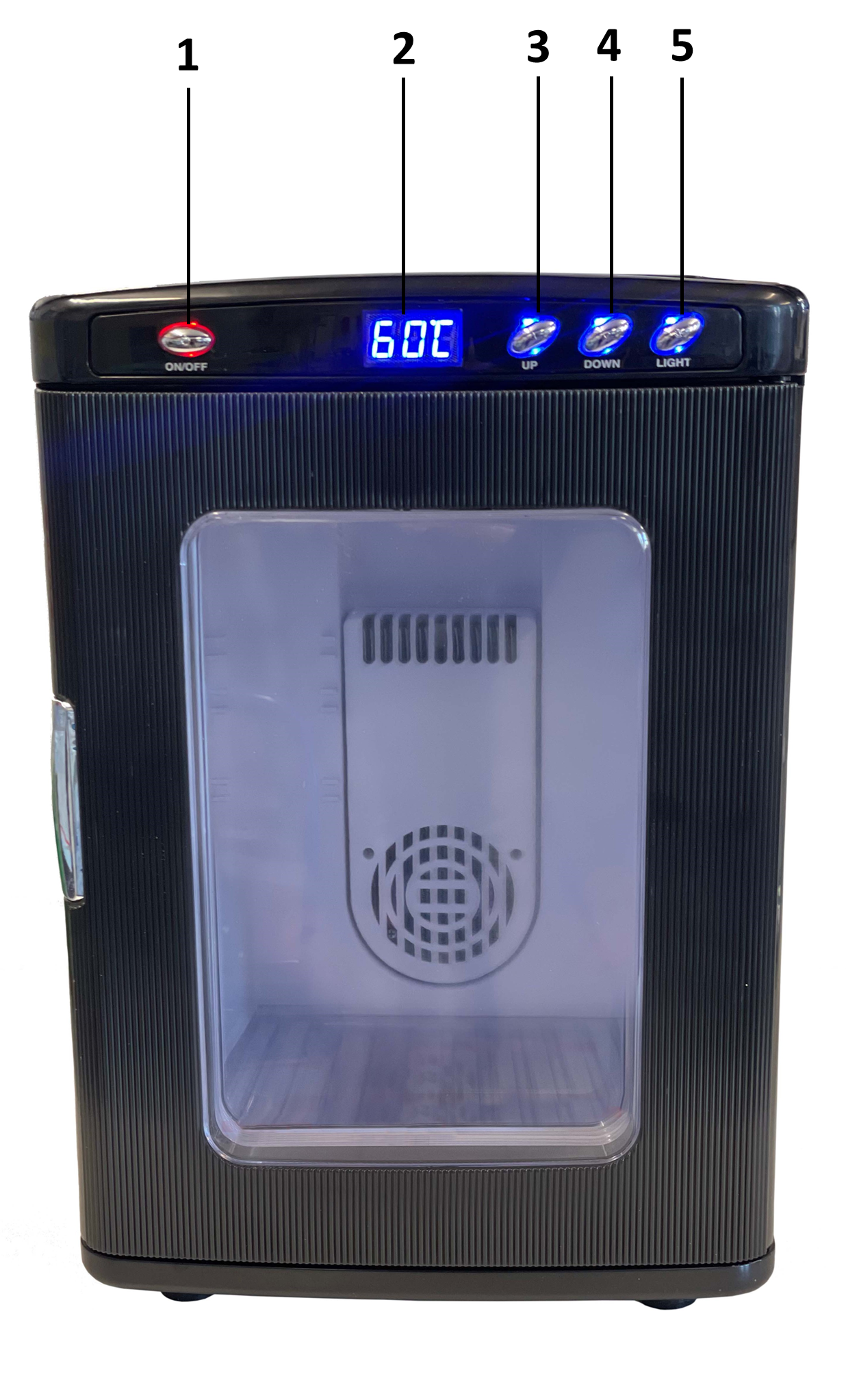
Incubator Controls
WARNING: The incubator is NOT MR safe and should NOT be brought into the MRI scan room as it presents a projectile hazard.
-
On/Off control
-
Temperature indicator
-
Temperature increase control
-
Temperature decrease control
-
LED light
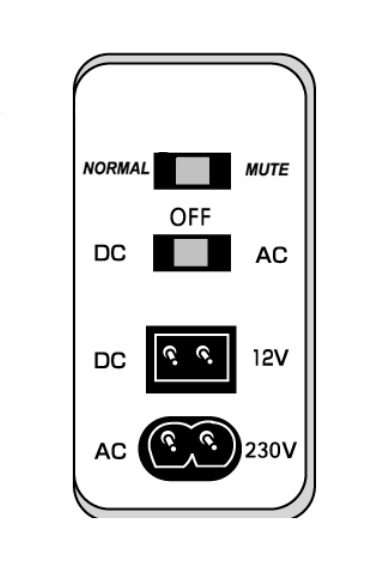
Mains power (100 - 240V) is provided to the incubator using a mains cable (supplied).
Incubator Use
-
Connect the incubator to a mains power source using the supplied mains cable.
-
Turn on the incubator by pressing the power button.
-
Set the desired temperature using the temperature increase/decrease controls.
Accessing the MutliSample120E vials
Please see the MultiSample120E instructions for use for details on how to install and replace vials in the phantom.
Filling the MutliSample120E Phantom with Phase Change Material
WARNING: It is imperative that the MultiSample120E phantom is NOT fully filled with PCM.
If the phantom is filled completely, the glue joints will fail due to the large pressure changes during melting/solidification.
Figures demonstrating MultiSample filling show a MultiSample120E with coloured vials to add contrast. This is for demonstration purposes only and instructions can be applied to all MultiSample models.
-
Power the Incubator, turn it on and set the temperature to 50 °C.
-
Place the jerry can of PCM into the Incubator.
-
Leave until all the contents have completely melted, this may take 12 - 24 hours.
CAUTION: Ensure that the Phase Change Material has completely melted before dispensing it into the MultiSample120E phantom. This may take more than 24 hours.
-
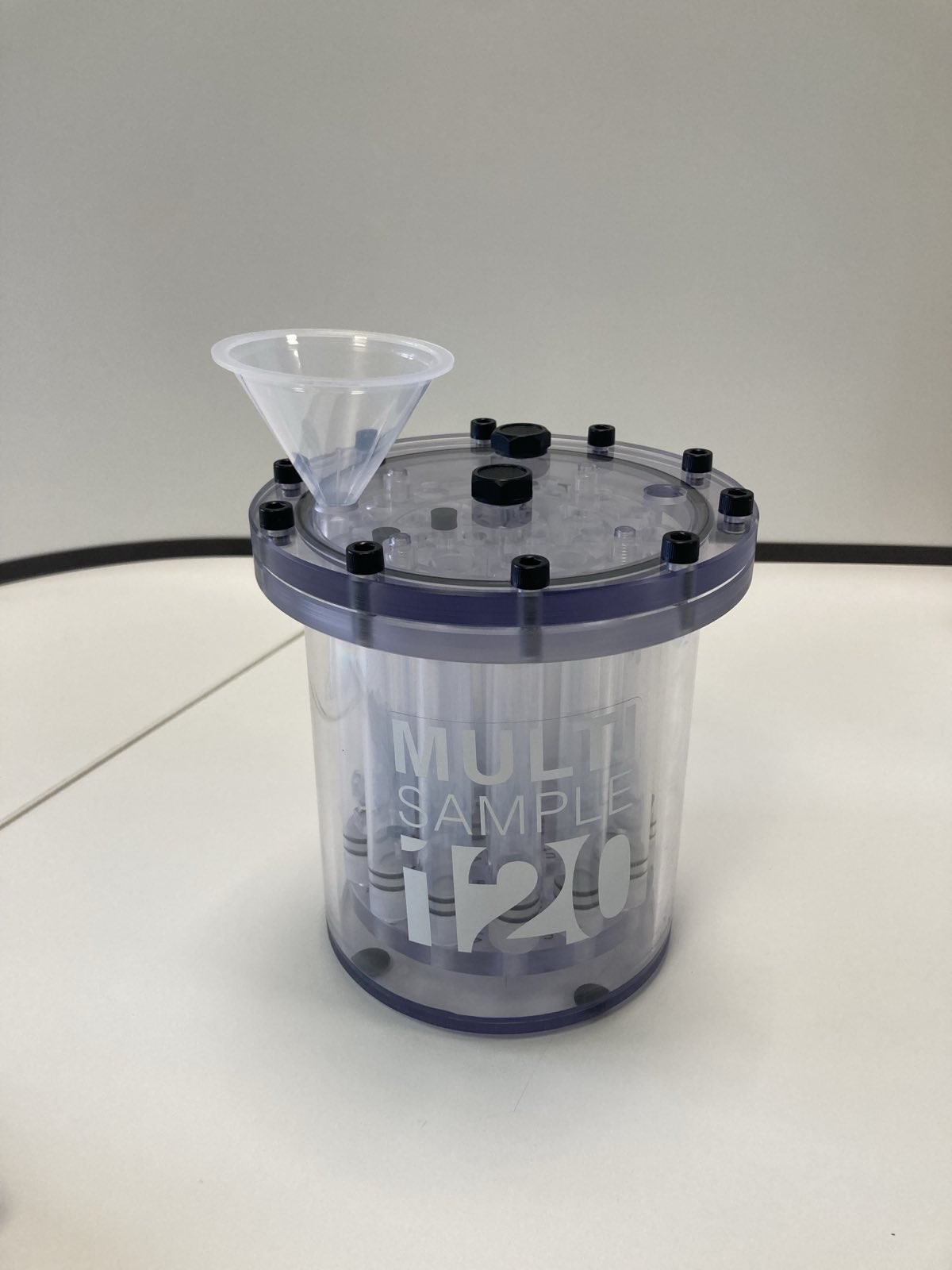
When ready to fill: Remove the two filling port caps from the MultiSample120E. (Refer to the MultiSample120E IFU on filling port removal) and fit the funnel into one of the ports. Place an absorbant material such as paper towels underneath the phantom.
-
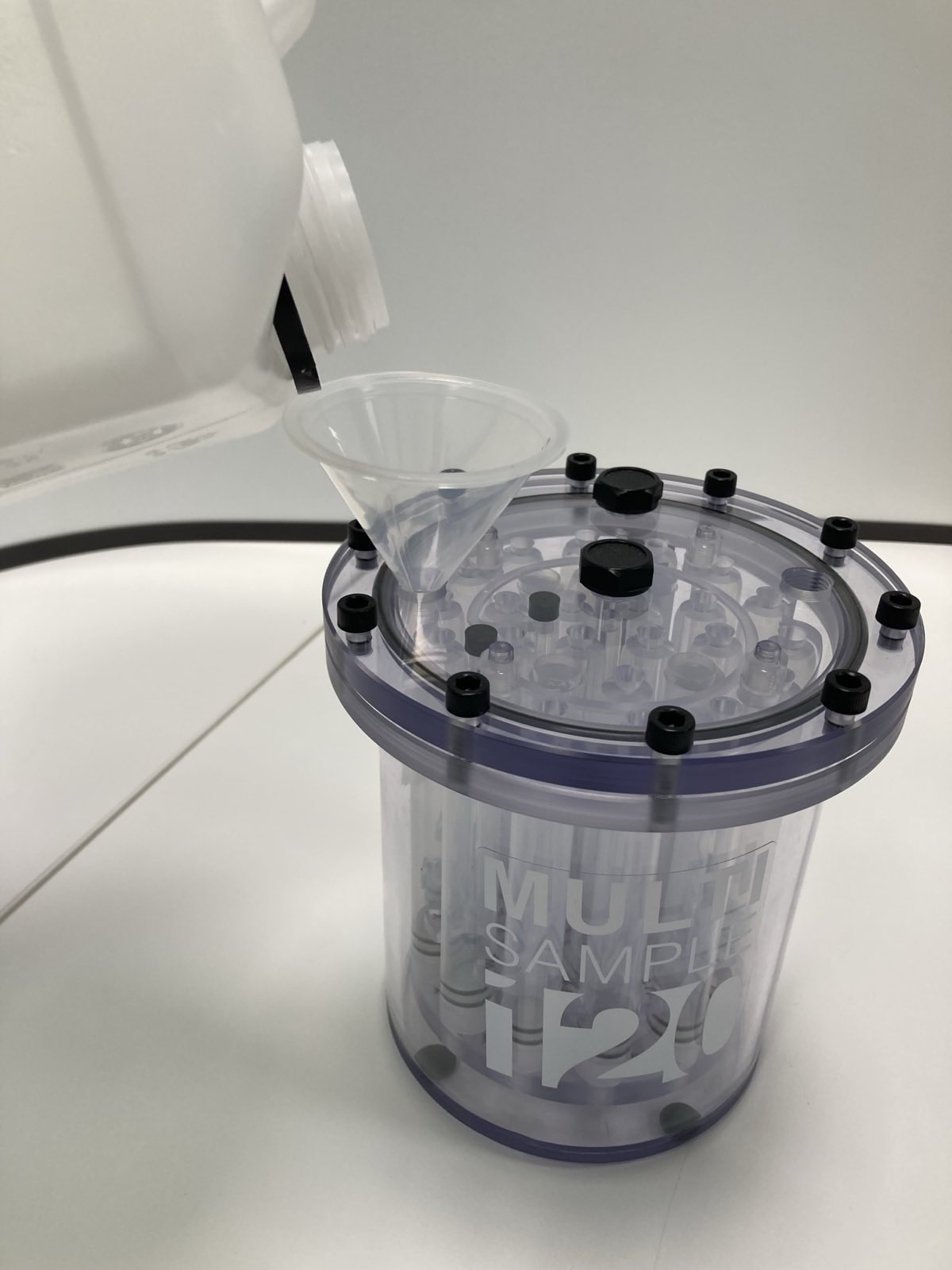
Pour the PCM into the phantom. Pour slowly to ensure that the funnel does not overflow and spill. During filling, it may be necessary to lift the funnel to allow for free flow of PCM into the phantom.
-
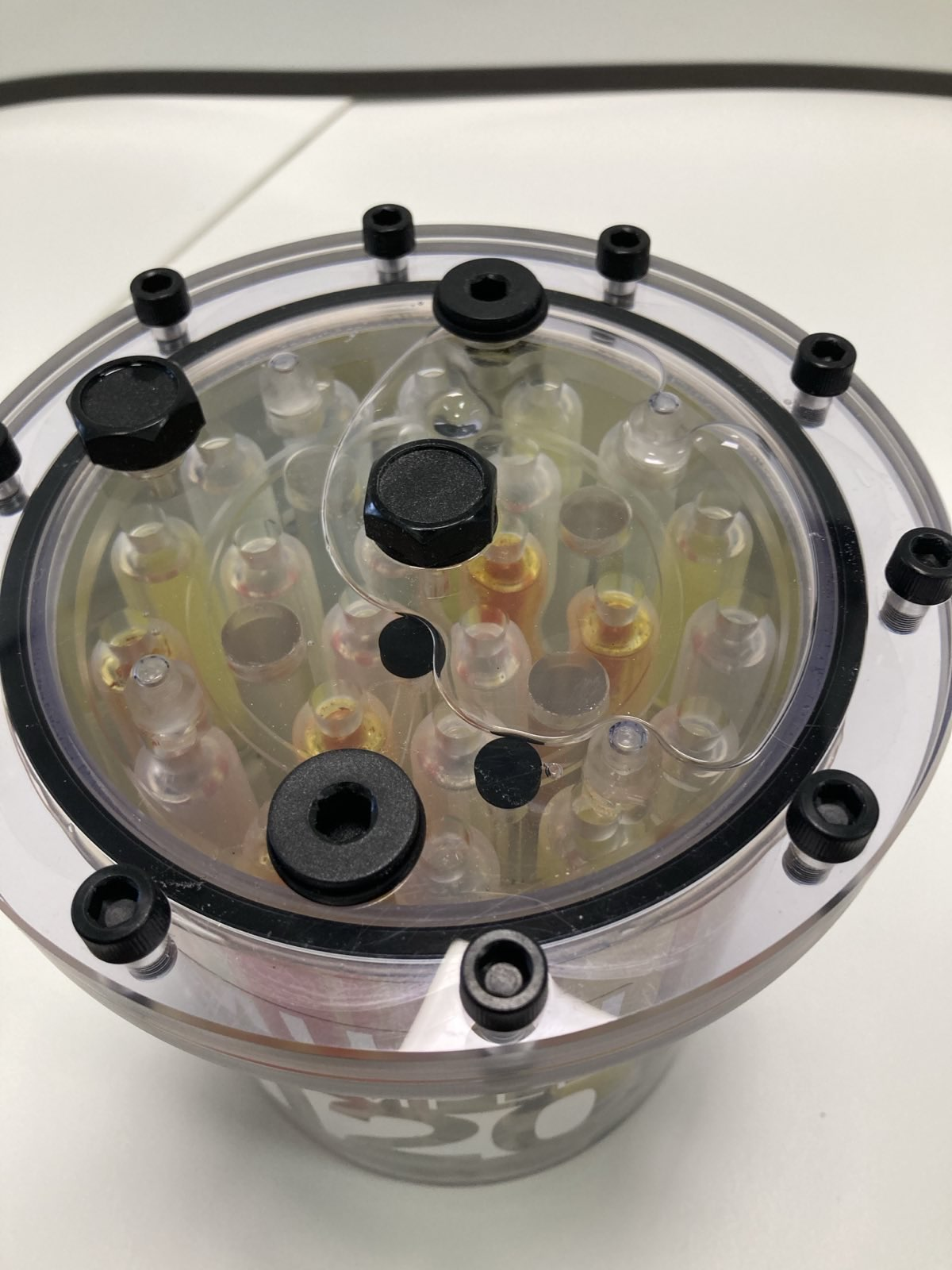
To allow for volume changes between the liquid and solid form do not completely fill the phantom. Leave a bubble approximately 80 mm in diameter (just over half the width of the lid), to provide compliance to volume changes in the PCM.
-
Re-fit the filling caps and tighten to 1.2 Nm (see the MultiSample120E IFU of further details).
-
The phantom can be inverted to observe the bubble
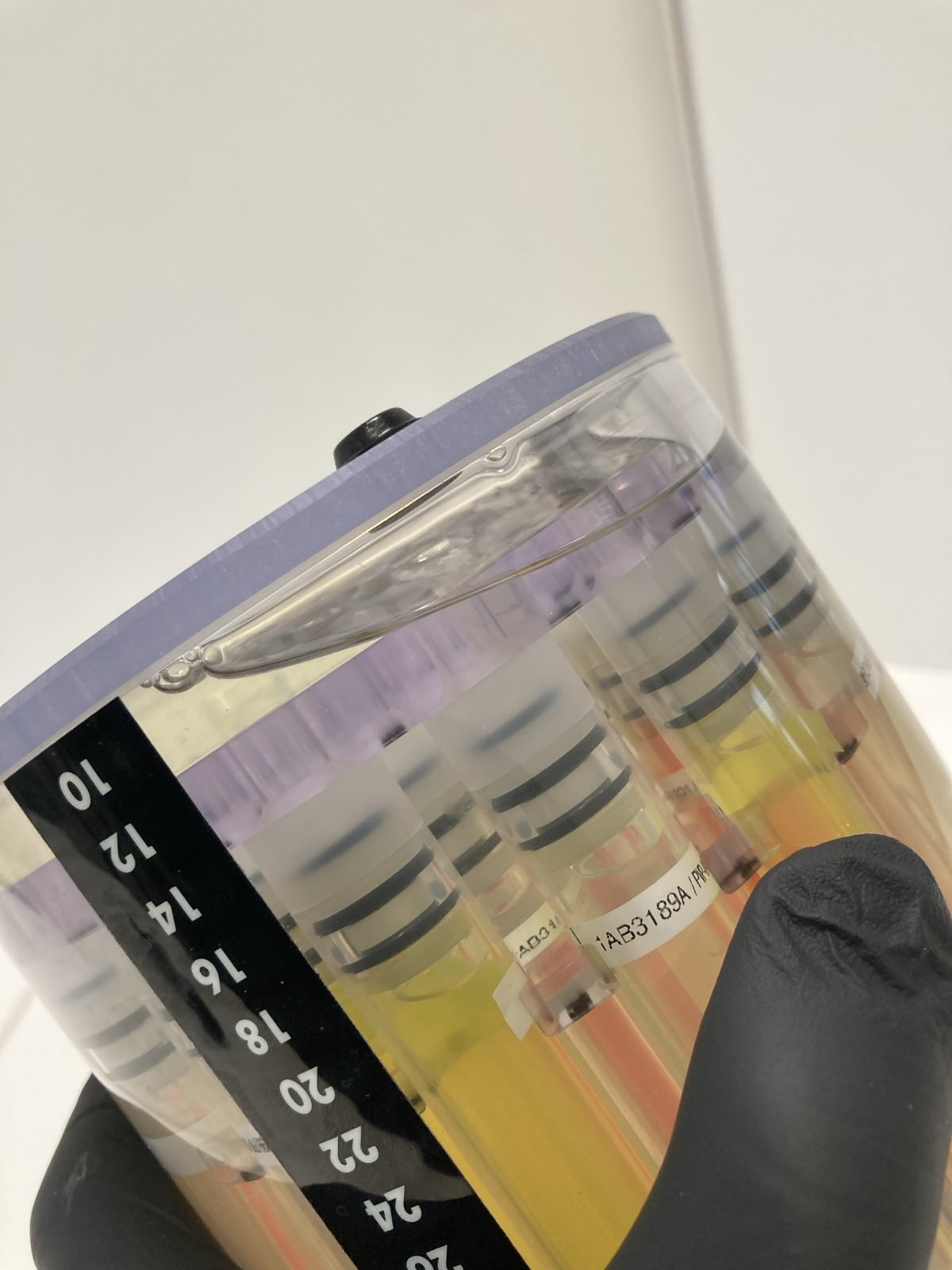
Appropriately sized headspace
Spilt PCM can be most easily cleaned when molten: to clean any on the outside of the phantom it back into the incubator at 45 °C, then clean with paper towels once melted.
MRI Scanning a phantom filled with PCM
The general principle of using a PCM filled phantom is to:
-
Heat the phantom in the incubator until the PCM has completely melted
-
Remove from the incubator and allow to cool to the solidification temperature
-
Once solidication starts the phantom can be scanned. The phantom will then remain close to the solidication temperature for several hours.
This requires some planning in advance of the use of the phantom to ensure that the PCM has fully molten, and that it has been removed in time to cool to the correct temperature. A proposed procedure is advised below, however the exact timing will depend on ambient conditions.
-
At least 36 hours prior to the MRI scan, power the incubator and set to 50 °C
-
Place paper towels on the base of the incubator to absorb PCM in the event of a spill
-
Slightly unscrew one of the filling ports of the MultiSample120E phantom
-
Place the phantom into the incubator. Wait for the PCM to fully melt. For a MultiSample120E at room temperature, this process takes up to 36 hours.
-
Once fully melted, remove the phantom from the incubator around 90 minutes prior to commencing the scan. Tighten the filling port that had been previously loosened to a torque of 1.2 Nm. Clean any excess PCM from the lid of the phantom.
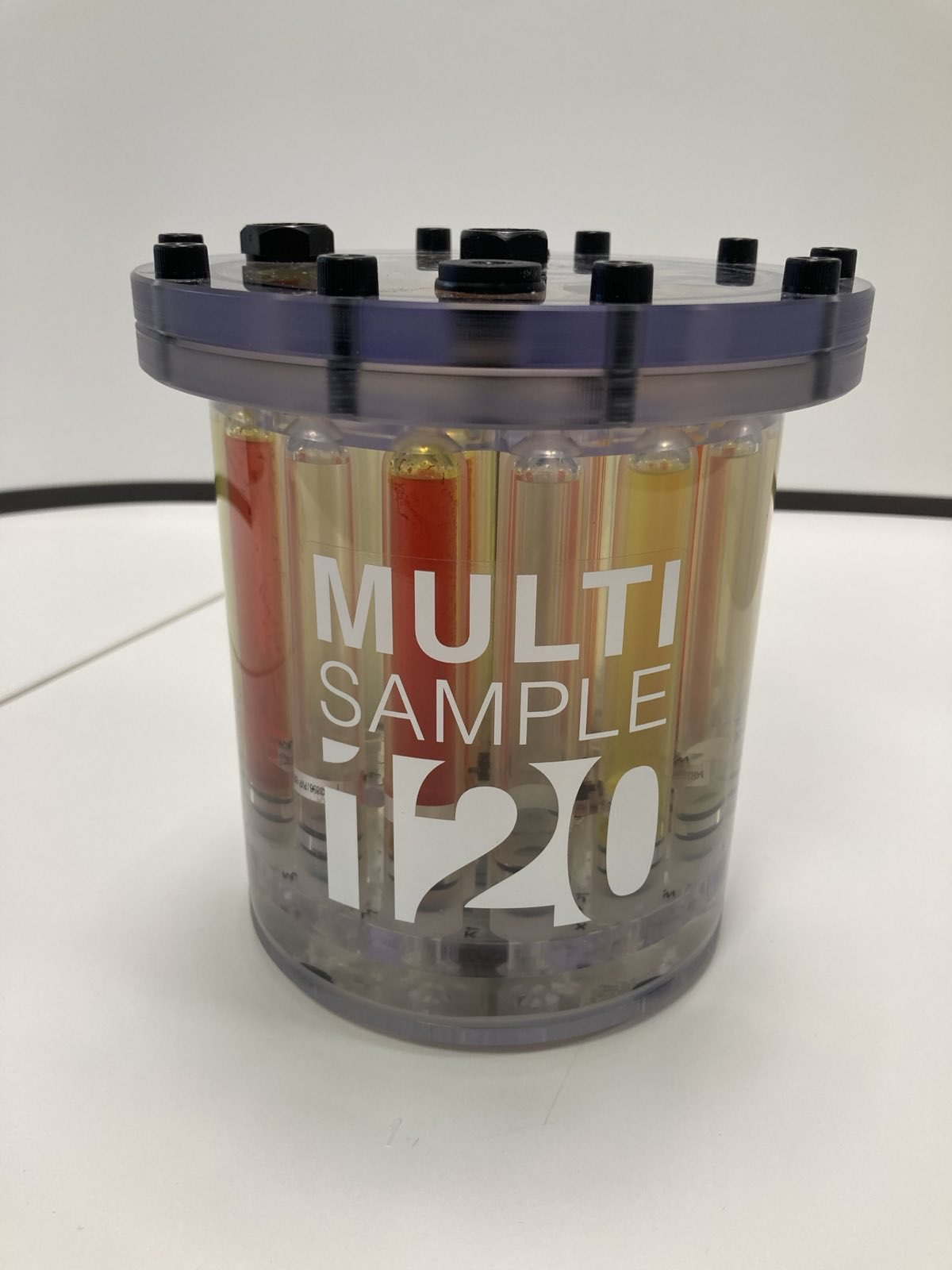
MultiSample120E filled with PCM, just after being removed from the incubator. -
Keep the phantom vertical whilst it cools down. The rate of cooling will depend on the ambient conditions.
-
The PCM will supercool slightly before starting to solidify, with its temperature dropping approximately 1 °C lower than the solidification temperature (approximately 36 °C).
-
Once solidication begins the PCM will start to turn opaque. During solidication the PCM releases latent heat, maintaining the phantom’s temperature constant.
-
The phantom can now be positioned horizontally - the already solidified PCM at the top of the phantom will keep the air bubble in place.
The phantom is now ready to be scanned.
Troubleshooting
|
Problem |
Possible Cause |
Solution |
|---|---|---|
|
PCM not melting in incubator |
Incubator not powered on / incorrect temperature setting |
Check power connection. Verify incubator is set to 50 °C. Wait sufficient time (>24 hrs). |
|
PCM leakage/spillage |
Overfilling of MultiSample or loose filling caps |
Ensure bubble headspace (~80 mm) is left. Retighten filling caps with supplied torque screwdriver (1.2 Nm). Clean spills by reheating phantom at 50 °C and wiping with paper towels. |
|
MultiSample not stabilising at ~37 °C |
PCM not fully melted before filling, or insufficient conditioning time |
Confirm PCM was completely liquid before use. Ensure phantom was incubated for at least 36 hrs prior to experiment. |
|
Incubator not heating |
Faulty power supply, fuse, or control system |
Verify mains power. Check cables and fuses. If fault persists, contact Gold Standard Phantoms. Do not attempt internal repair. |
|
Cracks or damage in MultiSample |
Phantom overfilled with PCM, or incorrect torque applied |
Ensure correct filling procedure with headspace. Always use supplied torque screwdriver. Contact manufacturer if damage is observed. |
|
Experimental observation of temperature >37 °C |
Phantom used too soon after removal from incubator |
Allow the phantom to cool at room temperature for at least 90 minutes after removal from the incubator, ensuring that the PCM has begun to solidify (“freeze”) before starting experiments. |
Adverse Events
Any adverse events that occur during the use of this device should be reported both to Gold Standard Phantoms and the relevant Competent Authority of the member state.
Warranty
Standard Manufacturer’s Warranty (SMW)
The phantoms carry as 1 year manufacturer’s warranty. This covers assurance regarding quality / lifespan with a promise to repair or replace the Temperature Control Bundle under a standard RMA (return merchandise authorisation). Shipping and Duty charges may apply.
Disposal
Do not allow the contents of the phantom to enter drains, sewers, or watercourses. Dispose of this material and its container as hazardous waste. Disposal should be in accordance with local, state, or national legislation.